Automating Quality Assurance with MuleSoft RPA and Composer
This case study outlines how a component manufacturing company leverages NJC Labs’ Hyperautomation of MuleSoft RPA with the MuleSoft Composer solution to automate its quality assurance process as part of its broader strategy to adopt Industry 4.0 technologies.
Challenge
The Quality Assurance (QA) team plays a crucial role in ensuring that manufactured components meet high-quality standards. Its daily responsibilities include inspecting components against various parameters using manual gauges, recording measurement values, identifying defects, raising non-conformance issues, and preparing comprehensive quality reports.
An analysis of the QA process revealed that, apart from component testing, most other tasks were repetitive, rule-based, and data-intensive. As a result, skilled employees spent considerable time on routine activities rather than focusing on their core competency: quality testing. This led to reduced operational efficiency, increased processing time, potential employee fatigue, a higher risk of errors, and lower productivity. To address these challenges, senior management decided to automate the process as part of its Industry 4.0 implementation strategy.
As a manufacturing company without a dedicated IT team or specialised database, the organisation wanted to deploy the solution on a workstation and assign its in-house maintenance team to oversee its development and operation, despite the team’s limited IT experience.
Objective
The objectives for a solution are highlighted below.
- Automation of repetitive and mundane tasks.
- Streamline quality control processes.
- Faster turnaround time.
- Increased data accuracy.
Understanding the Process
Let us break the process into four steps:

Solution
Below are listed the tools selected to match the company IT resource requirements.
- MuleSoft RPA – Can be deployed to the shop-floor workstation to automate manual repetitive tasks.
- MuleSoft Composer – A web-based tool used to integrate email, Excel, and ServiceNow.
- ServiceNow – A web-based tool used to record non-conformance.
MuleSoft enables teams to develop integrations that shop-floor maintenance personnel can easily manage, understand, and troubleshoot. Its low-code and no-code capabilities also allow business users with little or no coding knowledge to understand and use the solution with minimal technical support.
In this solution, MuleSoft Composer and MuleSoft RPA work as members of an automation tag team as follows:
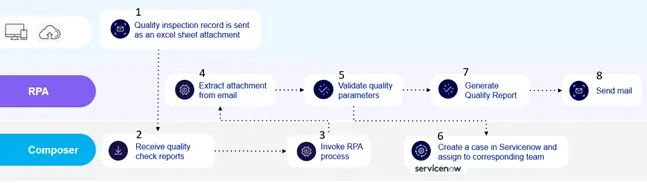
Refer to the image; the numbers below indicate what is happening at each part of the process.
- The Quality Inspector sends the quality inspection record to the central quality mailbox.
- MuleSoft Composer initiates the subsequent business process automation when a new unread email arrives in the inbox.
- MuleSoft Composer invokes the RPA process, “Read Data.”
- The RPA bot extracts the email attachment and reads the data from the Excel file.
- The RPA bot performs the Quality Control process by comparing the records against the target specification ranges.
- The RPA bot sends the specification data back to Composer, which creates a case in ServiceNow.
- The RPA bot generates a detailed Quality Report using the appropriate product template from the component catalogue.
- The RPA bot completes the workflow by sending the report to the Quality Inspector’s email address.
Results
The results of this simple integration are

Related Case Study: Automating Purchase Order Generation