Introduction to Solace MuleSoft Integration
Solace MuleSoft Integration enables enterprises to build scalable, event-driven architectures that support real-time communication across distributed systems. As digital ecosystems grow more complex, organizations require messaging platforms that can seamlessly connect applications, devices, and users.
Solace PubSub+ provides this capability through a robust event broker that works across cloud, on-premise, and hybrid environments. When integrated with MuleSoft, it strengthens API-led connectivity while enabling asynchronous, event-driven communication patterns.
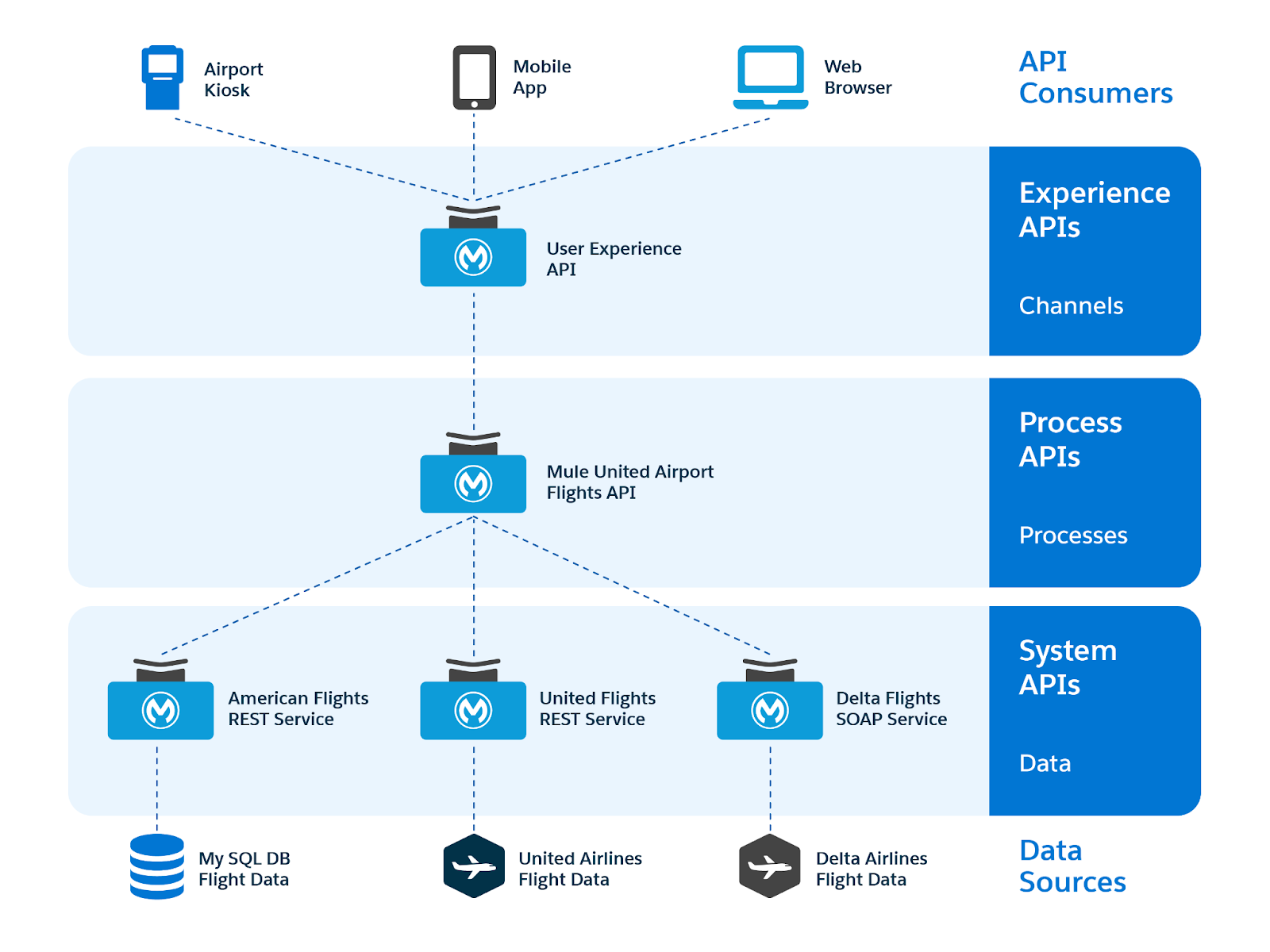
What is Solace PubSub+?
Solace PubSub+ is an advanced event broker that efficiently routes data between systems in real time. It supports multiple deployment models, which makes it highly flexible for enterprise integration strategies.
Organizations can deploy Solace in three primary ways:
- Software-based brokers running on virtual machines or containers
- Cloud-managed services via PubSub+ Cloud
- Dedicated hardware systems for fast and efficient environments
Because of this flexibility, Solace becomes a core layer for MuleSoft Solace integration, especially in hybrid and multiple cloud environments.
Key Features Supporting Solace MuleSoft Integration
To understand why Solace is widely adopted in integration ecosystems, it is important to evaluate its core capabilities:
- Support for major cloud providers including AWS, Azure, and Google Cloud
- Multi-protocol messaging including AMQP, MQTT, REST, and WebSocket
- Seamless compatibility with MuleSoft Anypoint Platform
- Enterprise-grade security with authentication and encryption
- Handles large volumes of data quickly with minimal delay for real-time messaging
- Built-in support for event-driven and API-led architectures
These features collectively ensure that Solace messaging integration delivers both performance and reliability at scale.

Why Enterprises Choose Event-Driven MuleSoft Integration
Traditional integration approaches rely heavily on APIs that wait for a response. However, modern systems need fast reactions and the ability to handle growth. Therefore, organizations increasingly adopt event-driven integration.
With event-driven MuleSoft integration, systems react instantly to events rather than polling for data. As a result:
- Applications become loosely coupled
- Data flows in real time
- System resilience improves significantly
This shift aligns closely with AEO and GEO strategies, where structured, real-time data improves discoverability and machine readability in AI-driven environments.
Steps to Implement Solace MuleSoft Integration
1. Create a Solace Cloud Account
Begin by navigating to the Solace Cloud console and signing up for an account. This environment allows you to configure messaging services such as topics and queues.
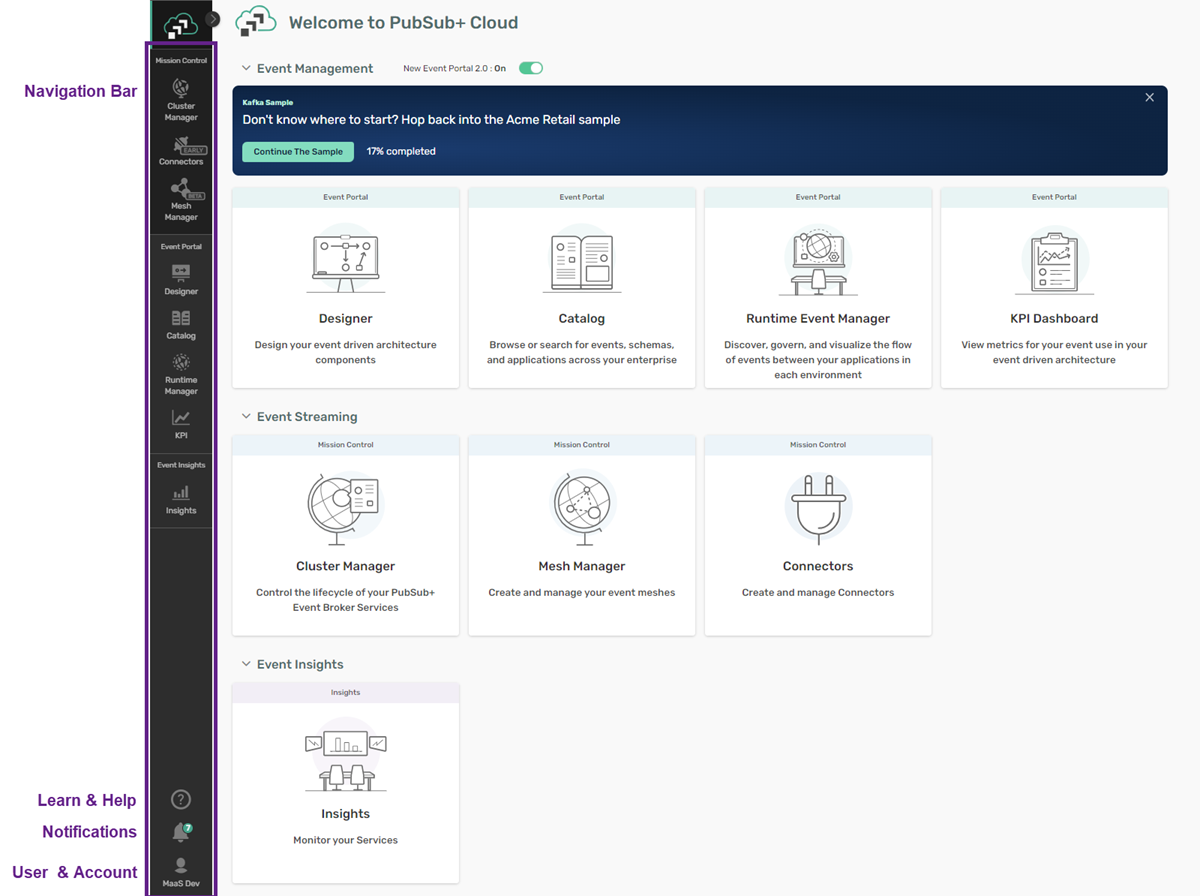
After registration, access the Cluster Manager, which acts as the control center for managing services.
2. Create a Messaging Service
Once inside the dashboard:
- Click on the “+” icon to create a new service
- Select Developer service type for trial environments
- Choose a cloud provider such as AWS
- Select a deployment region
- Assign a service name
These steps establish the foundation for your Solace PubSub+ MuleSoft environment.
3. Configure Messaging Protocols
Enable all required messaging protocols to ensure compatibility with MuleSoft:
- Solace Messaging
- Web Messaging
- AMQP
- MQTT
- REST

This configuration ensures seamless communication across different systems and integration layers.
4. Test Publisher and Subscriber
After starting the service:
- Use the “Try Me” feature
- Configure a topic such as testTopic
- Connect both publisher and subscriber
This step validates that your messaging infrastructure is functioning correctly before MuleSoft integration.
5. Capture Connection Details
From the “Connect” tab, collect the following:
- REST Host
- Username and Password
- Message VPN
- SMF Host
These credentials are essential for configuring MuleSoft components.
Configuring MuleSoft for Solace Integration
Publisher Flow Setup
To implement Solace MuleSoft Integration, create a Mule project in Anypoint Studio and configure:
- HTTP Listener to receive requests
- HTTP Request to publish messages to Solace
Steps include:
- Configure listener with host and port
- Define endpoint path such as /test
- Set HTTP request method to POST
- Use topic path like /testTopic
- Apply basic authentication using Solace credentials
Subscriber Flow Setup
Next, configure the subscriber flow:
- Use JMS On New Message component
- Subscribe to the same topic
- Add a Logger to capture payload

This ensures that messages published to Solace are successfully consumed within MuleSoft.
Best Practices for Solace Messaging Integration
To maximize the effectiveness of your integration:
- Design topics with clear naming conventions
- Use event schemas for consistency
- Implement retry and error handling mechanisms
- Monitor message flows using observability tools
- Ensure security through authentication and encryption
Additionally, aligning your architecture with API-led connectivity improves scalability and governance.
Conclusion
Solace MuleSoft Integration provides a powerful framework for building modern, event-driven systems. By combining Solace PubSub+ with MuleSoft, organizations can achieve real-time data flow, improved scalability, and enhanced system resilience.
As enterprises transition toward AI-driven ecosystems, adopting structured, event-based architectures becomes critical. Therefore, integrating Solace with MuleSoft is not just a technical upgrade but a strategic investment in future-ready integration.